 Navigator - Step 8
Hint: You can bookmark a group of tabs.
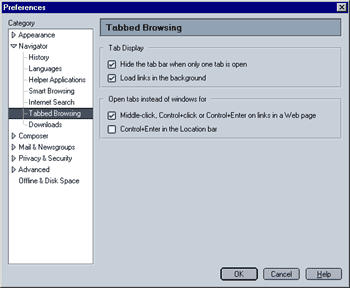
Tab Display
- Hide the tab bar when only one tab is open
When this option is selected, tabs will be hidden when only one web page is loaded in a browser window, i.e. the browser window will look "normal". - Load links in the background
When selected, this will open new tabs as an inactive tab, i.e. the page that you opened the link from is still displayed while the new page is loading. What this option does not do is load all the links of a given page page while you are viewing it. There are programs that actually do this, meaning that a page will already be cached when you click on a link. What Mozilla does is load the link you click on in the background while still displaying your current page (tab).
This option allows you to specify when a new page is displayed in a tab instead of in a new window. Another way to open a page in a tab is to right-click on a link and select "Open Link In New Tab".
 |
Back |
|
Next |

|