 Navigator - Step 7
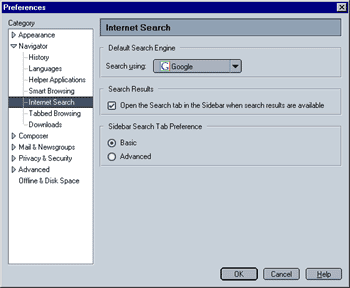
- Use the sidebar search tab.
- Use the location bar search.
- Highlight text in any web page and search by right-clicking the highlighted text and selecting "Search...".
- Go directly to search engines (like e.g. Google) and have the results displayed in the browser window as well as in the side bar.
Select the search engine you wish to use. This setting also affects which search engine will be used when you search by highlighting and right-klicking text.
Search Results
When this option is selected, the sidebar will automatically open once results to your search are available. This option is enabled by default.
Sidebar Search Preference
You have two options:
- Basic: When this option is selected, you can use one search engine at a time to search the internet. You can select a search engine from the dropdown-menu in the Sidebar search tab.
- Advanced: Selecting the advanced option allows you to use several search engines simultaneously. In addition, you can create search groups (i.e. "Web", "News",...) and specify which search engine(s) will be used for each group.
 |
Back |
|
Next |

|