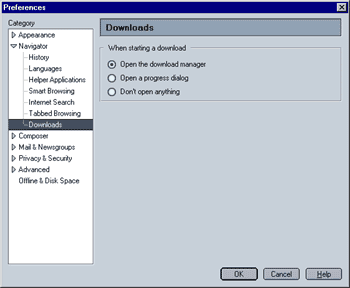
In the "Downloads" menu, you can specify that Mozilla does the following when downloading a file:
- Open the download manager
When selected, Mozilla will show the download manager once a file is being downloaded. Donwload manager allows you to pause and resume a download in your current session if the server you are downloading from supports this feature.
- Open a progress dialog
When selected, Mozilla will show a progress dialog once a file is being downloaded.
- Don't open anything
When selected, Mozilla will silently download the file. I recommend against selecting this option since you will have no way of telling how fast is being downloaded (if at all) and when it's completed.
|
 Navigator - Final step