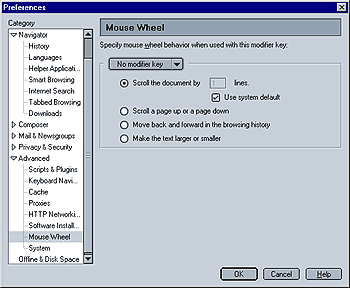
This
menu allows you to configure how Mozilla reacts to the Mouse Wheel. The default
is "System default", i.e. the document will be scrolled by however many lines
that your system (e.g. Windows) specifies. You can also use the Mouse Wheel
to
- Scroll an entire page up or down
- Move back and forward in the browsing history (like Netscape 4 does)
- Make the text larger or smaller (i.e. zoom in/out, which can come in handy if you are visually impaired.
Please note that you can select a separate behavior, depending which modifier key ("Alt", "Control" and "Shift" - select the key from the dropdown menu) is pressed while you use the scroll wheel. This allows you to e.g. specify that just using the scroll wheel will scroll the page up and down, while using the scroll wheel and simultaneously pressing the "Shift" key will make the text smaller and larger. You can specify a different behavior for each instance (no modifier key, Alt, Shift, Control).
|
 Advanced - Step 9 - Mouse Wheel