 Advanced - Step 7 - Networking
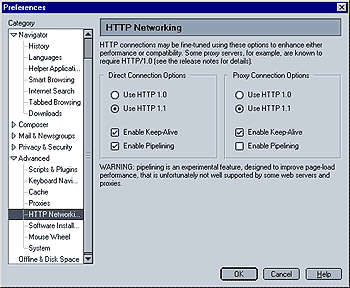
Use HTTP 1.0 / 1.1
HTTP 1.1 is a newer version of HTTP (Hyper Text Transfer Protocol). You can find more information on the W3 website.
This is what Willy Wonka had to say about it in Mozillazine's forums:
"As for selecting HTTP 1.0, some servers don't like HTTP 1.1 as they haven't been upgraded - so to view their content you will have to force mozilla to use 1.0. Also some proxies (proximatron I believe) don't accept HTTP 1.1 either."
Enable Pipelining
Here is what Willy Wonka had to say about it in Mozillazine's forums: "Pipelining helps when you are downloading lots of images. What it does is instead of saying 'Get image A.' and then making another request and saying 'Get image B' it sets up a batch operation and says 'Get images A through Z'. That way the server can line up the images and just keep firing them down the pipe."
This option is disabled by default because some servers don't like it (I've been using it for a while now and I've only found a couple problem sites, but it's nothing a reload wouldn't fix)."
Update:A HTTP 1.1 / Pipelining FAQ is available here at Mozilla.org.
 |
Back |
|
Next |

|