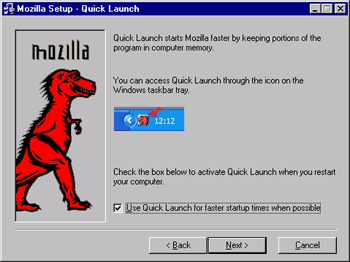
 How to install Mozilla - Step 8
 |
Back |
|
Next |

|
| How to install Mozilla - Step 8
|
|||||||
|
|
|||||||
| In this screen, you can either select or deselect Quick Launch. If you plan on using Mozilla as your default browser, I recommend selecting Quick Launch as it will noticeably decrease the time it takes for the browser to launch. This feature can be turned off at any time by right-clicking on the Mozilla icon in the System Tray and selecting "Disable Quick Launch". You can find more information on this feature in the Installation FAQ. After that, click on "Next" to continue. |
|||||||
|
|||||||