 How to install Mozilla - Step 17
 |
Back |
|
Next |

|
| How to install Mozilla - Step 17
|
|||||||
|
|
|||||||
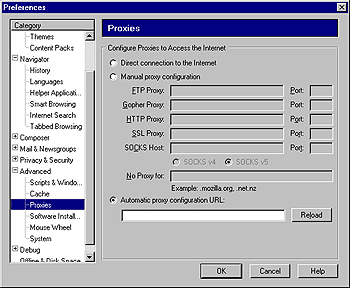
| You are now in the preferences menu. Click on "Proxies" under the "Advanced" tab. If you do not see "Proxies", click on the "+" next to "Advanced". You can either manually enter your proxy setings, or enter an automatic proxy configuration URL. Please remember that you will only need to do this if you are not directly conected to the internet! If Mozilla displays a web page after starting, you are fine. |
|||||||
|
|||||||