 How to install Mozilla - Step 15
 |
Back |
|
Next |

|
| How to install Mozilla - Step 15
|
|||||||
|
|
|||||||
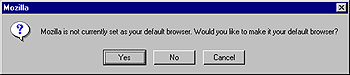
| Click on "Yes" if you want to make Mozilla your default browser. This means that Mozilla will be used to open internet shortcuts and HTML documents. Please note that Mozilla will also be made the default program for .jpg and .gif images. You might want to change that later on if you are using image editing software such as Adobe Photoshop. |
|||||||
|
|||||||