 Advanced - Step 3
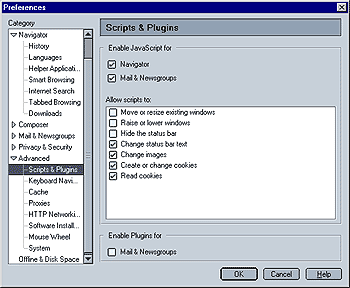
Enable Java Script for:
This option lets you enable/disable JavaScript for Navigator (the browser) and Mail & Newsgroups. My recommendation is to enable it for Navigator and to disable it for Mail & Newsgroups.
Allow webpages to:
This is very user user-friendly feature and sets Mozilla apart from other browsers, especially IE. This will affect all web pages. If you wish to set these options on a per-page basis, you can install the Policy Manager Add-on / extension.
Please note that the option "Open unrequested windows" that blocked unrequested (i.e. automatic) popup windows that was configurable in this menu for Mozilla 1.0.x has been moved to "Privacy and Security".
Since these menu items are pretty self explanatory, here are my suggestions:
De-select the following:
"Move or resize existing windows"
"Raise or lower windows"
"Hide the status bar"
Leave the following selected:
"Change Images" (this is e.g. used for mouse over effects)
"Create or change cookies"
"Read Cookies"
All other features will (in my opinion) neither hurt if selected or deselected.
Enable Plugins for Mail & Newsgroups:
This option allows you to enable or disable plugins for Mail and Newsgroup Messages. I recommend you disable them by unchecking this option.
 |
Back |
|
Next |

|