 Advanced - Step 2
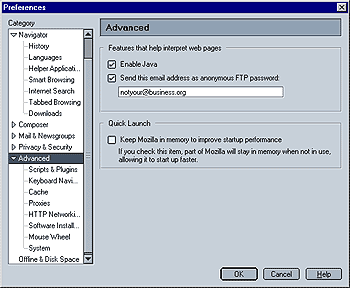
This option lets you enable/disable Java. Please note that Mozilla uses Sun JRE, which does not come with Mozilla. You first need
to install Java. Mozilla should automatically find Java once it is installed on your system. If it doesn't, manually copy the Java Plugin to Mozilla's plugins folder.For instructions how to do that, please go here.
Send this email address as anonymous FTP password
This is actually an important privacy feature. Many sites use FTP
(file transfer protocol) when you download files (e.g. programs). Your browser will usually log in as an anonymous user. Sometimes, your email address is sent as password. If you ever wondered how your email address ended up with spammers - this is one way.
The great thing about Mozilla is, that it lets you specify which email address is sent as password, so you can easily make it something like
"no@spam.com". Just make sure you neither use your own nor someone else's address.
Enable Quick Launch
This lets you enable or disable the Quick Launch feature. Quick Launch means that parts of Mozilla stay in your system's memory at all times, making for a faster launch of Mozilla. Internet Explorer works the same way. For more information on this feature, please go here.
 |
Back |
|
Next |

|