 Mozilla Mail - Step 7
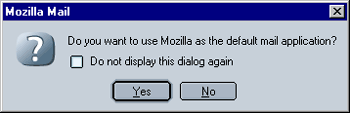
If you want to make Mozilla Mail your default mail application, select Yes, otherwise select No. This setting is system-wide, i.e. it will influence all other web browsers. Please note that Mozilla will use Mozilla Mail as its default mail application regardless of this setting (please see the "Using Mozilla" FAQ for instructions on how to change that).
Also, make sure to check out my summary of Hard Tecs 4U's review of Mozilla's automatic Spam filter. The summary explains how Mozilla's Spam filter works and how to properly train it for optimal results, something that is unfortunately not very transparent with current (1.7 and below) versions of Mozilla.
 |
Back |
|
|
|