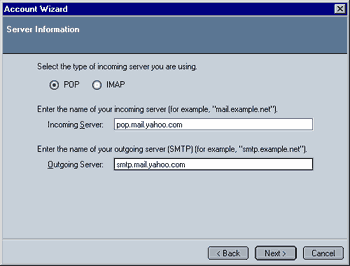
This screen is for entering the server information. Please check with your email provider/ISP which settings apply for your account. You can enter/select between the following:
- Select the type of incoming server you are using:
- POP3: This is the server type most commonly used.
- IMAP: Some providers offer IMAP access, usually at a premium.
- Enter the name of your incoming server:
- The incoming server is the server you receive your mail from. In the case of "Yahoo Mail", the name is "pop.mail.yahoo.com"
- Enter the name of your outgoing server:
- The outgoing server is the one you use to send your messages. Please note that the incoming and outgoing server usually have different addresses! In the case of "Yahoo Mail", the name is "smtp.mail.yahoo.com"
When done, please click on Next to continue.
|
 Mozilla Mail - Step 3