 Mozilla Mail - Step 2
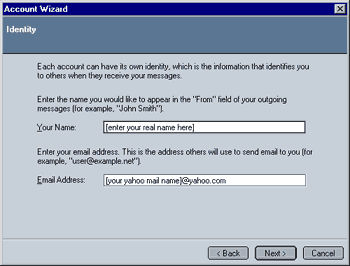
- Your Name: You can either enter your real name (e.g. "John Doe") or an alias (e.g. "Johnnyboy"). What you enter here will appear as the sender when you send someone mail.
- Email Address: Enter your full Email Address (without the parentheses!) here (e.g. "JohnDoe@yahoo.com"). I have chosen a "Yahoo Mail" account as an example.
Click on Next to continue once you have entered the required information.
 |
Back |
|
Next |

|