 Navigator - Location Bar Autocomplete
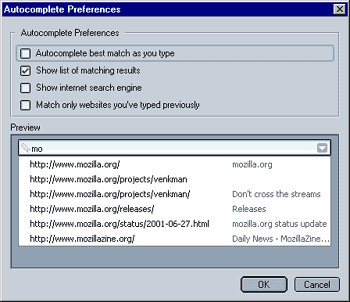
You can select between the following:
- Autocomplete best match as you type
When checked, Mozilla will autocomplet while you type, otherwise Mozilla will just show a list of matching results below the location bar. - Show list of matching results
When checked, Mozilla will show a list of matching results, otherwise it won't - Show internet search engine
When checked, Mozilla will show the option to use you default search engine to search for whatever you type in the location bar, otherwise it won't. - Match only websites you've typed previously
When checked, Mozilla will only show/use websites you have previously typed for its autocomplete feature, otherwise it will also show websites you have visited (by e.g. clicking on a link).
 |
Back |
|
Next |

|