 Navigator - Step 6
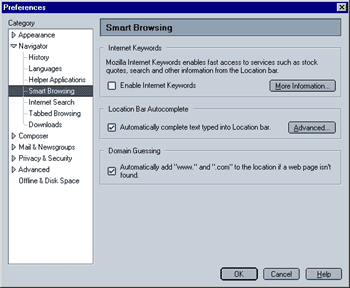
Internet Keywords
"Internet Keywords are a method of trying to work out what you meant when you type something that is not a URL into the URL bar". You can find more information on Internet Keywords here. Your options are to either enable or disable Internet keywords. They are enabled by default.
Location Bar Autocomplete
When enabled, this feature tries to "guess" the web address you are trying to reach when you manually type a URL. If, for example, you begin typing "www.moz", Autocomplete will show a dropdown list with sites like "www.mozilla.org", "www.mozillazine.org" and so on. The selection is based on locally stored (i.e. on your computer) information on sites that you have previously visited. If you click on the "Advanced" Button, you specify in detail how the Autocomplete feature works. This will be explained in the next step
Again, you can either turn this option off or leave it on (it is turned on by default).
Domain Guessing
When enabled, Mozilla will automatically add "www." to the beginning and/or ".com" to the end of a web address you typed if the site cannot be found. This mirrors IE's behavior in that case.
 |
Back |
|
Next |

|