 Navigator - Add a new Mime Type
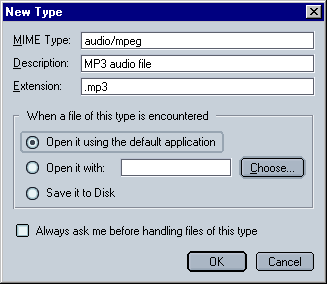
The description can be anything you want it to be (in this example I used "MP3 Audio File").
Specifying the file extension is rather easy. The hard part is knowing the mime type. You will have to look it up. There are several sites on the web that have a list of mime types like e.g. this one. For more information on Mime types, i.e. what they are and do, go here: The Netscape unofficial FAQ - A Short MIME Tutorial.
Once you have entered the necessary data into the text fields, you can tell Mozilla what to do when it encounters a file of this type.
- When a file of this type is encountered
- Open it using the default application:
This is the setting I would recommend if you want the file to be
opened rather than saved to the disk. Mozilla will use the
default application, i.e. the same program that is automatically
used by your PC's Operating System when you double-click
(for Windows) on a file of this type
- Open it with
In case you want Mozilla to use a different apllication than the
default one, select this option. Click on "Choose"
to select the application. You will have to know where it is
(usually under "C:\Program Files\[Name of Program]) and
what it's called. It normally has a *.exe extension.
- Save it to Disk
When this option is selected, Mozilla will save these files to your
harddrive instead of opening them with an application.
If "Always ask me before handling this file type" is not checked, Mozilla will always use the settings specified here (i.e. not ask you what to do).
 |
Back |
|
Next |

|