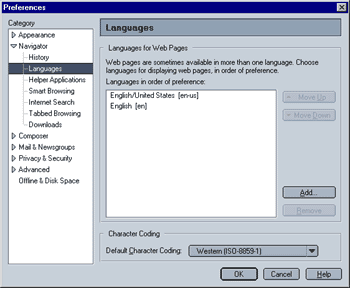
This next screen allows you to specify, which language web pages are displayed in. and which character coding is used
- Languages for Web Pages
This option will only work, if the web site supports this feature. Many larger sites do. Simply type "www.largecompanyname.com" (try www.real.com) and, depending on your settings for this option, you will see the english-, spanish- or german-language version (for example) of their page. This option does not affect Mozilla, i.e. the language used for Mozilla's menus will remain unchanged!
By default, "English United States" is activated. Click on the "Add" Button to add more languages. Languages are displayed in order of preference, the language on top being the prefered language. To change the order, simply select a language and click on the "Move Up" or "Move Down" Buttons.
- Character Coding
Character coding determines, how as web page's text is decoded. Leaving this setting on the standard value is fine, unless you plan on mostly visiting sites that do not use US/Western European characters (e.g. sites in Hebrew, Russian, Japanese).
|
 Navigator - Step 4