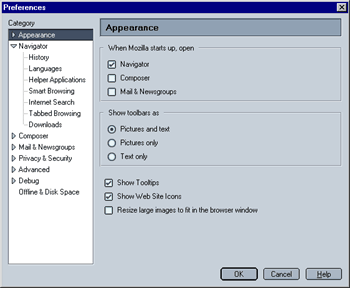
This is what you will see when you click on the category heading "appearance". You can select the following:
- When Mozilla starts up, open:
This lets you select which Mozilla component opens when you start Mozilla. The default setting is Navigator (the browser component). You can also chose Composer (an HTML editor) or Mozilla mail.
- Show toolbars as:
This option allows you to chose between having your toolbars use
- Pictures and text
- Pictures only
- Text only
Note that the "pictures and text" may not be available for all themes.
If you e.g. chose "Text only" Mozilla will not display buttons for "Back", "Forward" and similar funktions but text labels only.
- Show Tooltips:
Whne enabled, Mozilla will show tooltips when you move your mouse over buttons or links, explaining what they do.
- Show Web Site Icons:
When enabled, a site icon (aka favicon) will be shown next to a site's URL in the address bar. Please note that while most major sites do have a favicon, many smaller sites do not.
- Resize large images to fit in the browser window:
When enabled, this option will automatically resize (large) images to fit in your browser window without the need to scroll. It is in my opinion a very useful feature.
|
 Appearance - Step 2